Welcome to ClientVPS Mirrors

README

GBIF-Dataset-Explorer (gde)

R Package to explore datasets from the biodivesity aggregator GBIF.

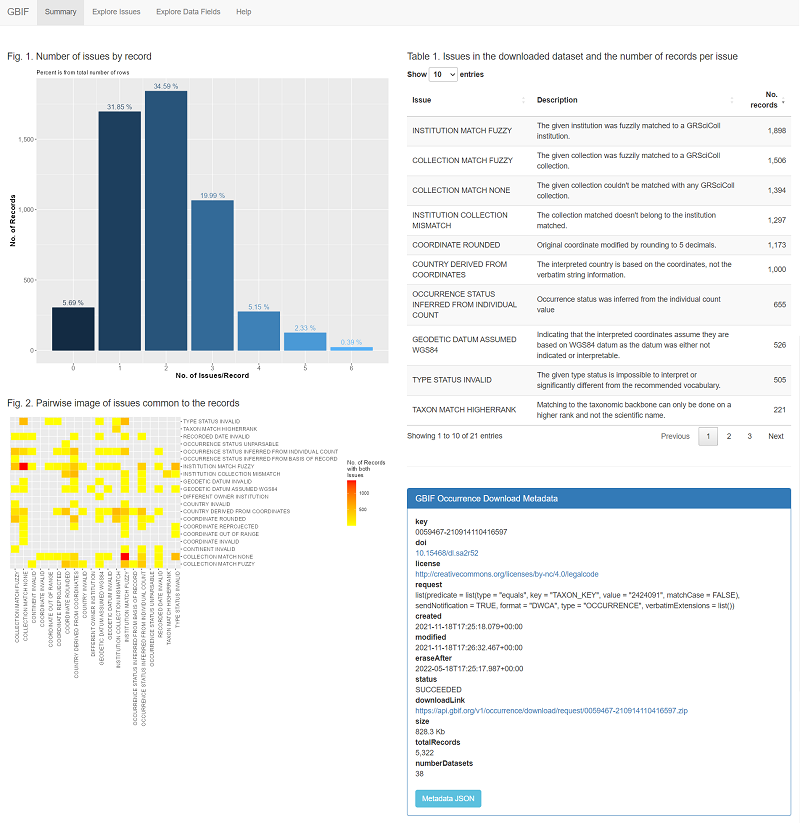
Once a DwC dataset is loaded, you can explore the issues and data values using a Shiny UI.

Screenshot of the Shiny app

Load data from a DwC download

  1. Install the package from CRAN: install.packages("gde")
  2. Download a DarwinCore zip file from GBIF
  3. Run the function gde::load_gbif_dwc(zipfile = "000000.zip", tmpdir = "tmp"), editing the arguments as needed

This step might take a while, depending on the size of the download and the specs of your computer.

Run the app locally

After loading the data to the database, run the Shiny app using:

  1. Run using: gde::launchApp()

Need a high-speed mirror for your open-source project?
Contact our mirror admin team at info@clientvps.com.

This archive is provided as a free public service to the community.
Proudly supported by infrastructure from VPSPulse , RxServers , BuyNumber , UnitVPS , OffshoreName and secure payment technology by ArionPay.